Network Segmentation for On-Premises Kubernetes with VLANs and pfSense
Introduction
Kubernetes has emerged as the de facto standard for container orchestration, empowering organizations to deploy and scale applications with unprecedented agility. Running it on-premises adds a layer of complexity that cloud users rarely encounter: you own the network, and the security boundaries that AWS or GCP draws for you have to be drawn by hand.
This article covers the network groundwork worth laying before deploying production workloads to a self-hosted Kubernetes cluster — carving a flat home- or small-office LAN into isolated VLANs, picking the hardware and software that keeps the bill of materials open and free, and the planning that goes into doing it cleanly.
It’s the foundation that an Ingress controller, cert-manager, and a public-facing service eventually sit on top of. Get this layer wrong and none of the later pieces are safe to expose.
Abstract
Exposing services from an on-premises Kubernetes cluster starts long before the first Ingress resource is applied. This article walks through the network-segmentation foundation: why a flat network is a poor starting point, how VLANs provide isolation without rewiring, and the planning checklist for laying them out cleanly. Aimed at infrastructure engineers and SREs running Kubernetes outside the major clouds.
Technical Background
Kubernetes Basics
Kubernetes shines in on-premises environments by providing a unified platform for managing containerized applications across diverse hardware and legacy systems. Its declarative configuration and automation capabilities streamline deployment processes, reducing manual intervention and the potential for errors. Additionally, Kubernetes’ built-in features like load balancing, self-healing, and scaling enable organizations to achieve high availability and efficiently respond to changing demands, making it a valuable asset for any on-premises infrastructure.
Networking Fundamentals
A Kubernetes cluster needs two distinct kinds of network reachability. East-west traffic — pods talking to other pods, nodes talking to each other, the control plane talking to workloads — must be fast, low-latency, and confined to the cluster. North-south traffic — clients on the LAN or the public Internet reaching a service inside the cluster — must be filtered and terminated at a known boundary.
A flat home or small-office network collapses these two concerns into a single broadcast domain. Every device — IoT thermostat, guest laptop, Kubernetes node — sits next to every other, with nothing but host-level firewalls between them. That’s manageable for a handful of devices, but it stops scaling the moment you want to publish a service to the Internet: a misconfiguration anywhere on the LAN becomes a path into your production workloads.
The first move, then, is to draw a line. A VLAN gives us a logical boundary on the same physical wiring — the cluster lives behind it, the firewall polices what crosses it, and everything that follows (Ingress, certificates, NAT) builds on top of that boundary.
Tools, Technologies and Projects
Below is the full stack that eventually ran on top of this network. The networking-layer pieces (ESXi, K3s, pfSense, a VLAN-capable switch) are the focus of this article; the Kubernetes apps and services are listed for context.
Core Infrastructure
- VMWare ESXi running on physical hosts to host Ubuntu VMs. Proxmox VE is a free alternative.
- K3s, a lightweight Kubernetes distribution.
- A router running pfSense, such as the Netgate 8200.
- A switch that supports VLANs.
Kubernetes Apps and Services
- ArgoCD, a declarative, GitOps continuous delivery tool for Kubernetes.
- MetalLB, a load-balancer implementation for bare metal Kubernetes clusters, using standard routing protocols.
- Longhorn provides cloud-native distributed block storage to non-cloud-hosted Kubernetes clusters.
- cert-manager provides automated, cloud-native certificate management for workloads running on Kubernetes.
- Ingress-Nginx is an Ingress controller for Kubernetes using NGINX as a reverse proxy and load balancer.
VLAN Setup
Assume a small organization with a flat network on which all hosts can communicate with each other. While easy and convenient to set up, this allows for unlimited communication between every device on the network — a poor starting point for hosting workloads you intend to expose to the Internet.
To create a reasonable degree of isolation, we’ll create a VLAN. This is a software- and configuration-defined solution that isolates production traffic from the rest of the network without requiring any physical rewiring or moving of cables.
Implementing VLANs requires a bit of planning. You need to define:
- The traffic you want to isolate.
- How many devices you will have on each VLAN.
- The IP range of each VLAN, ensuring no overlap between ranges.
- Inter-VLAN communication requirements (which VLANs need to talk to each other).
- VLAN tagging on your switch(es).
- DHCP configuration for each VLAN.
- Firewall rules to control traffic between VLANs.
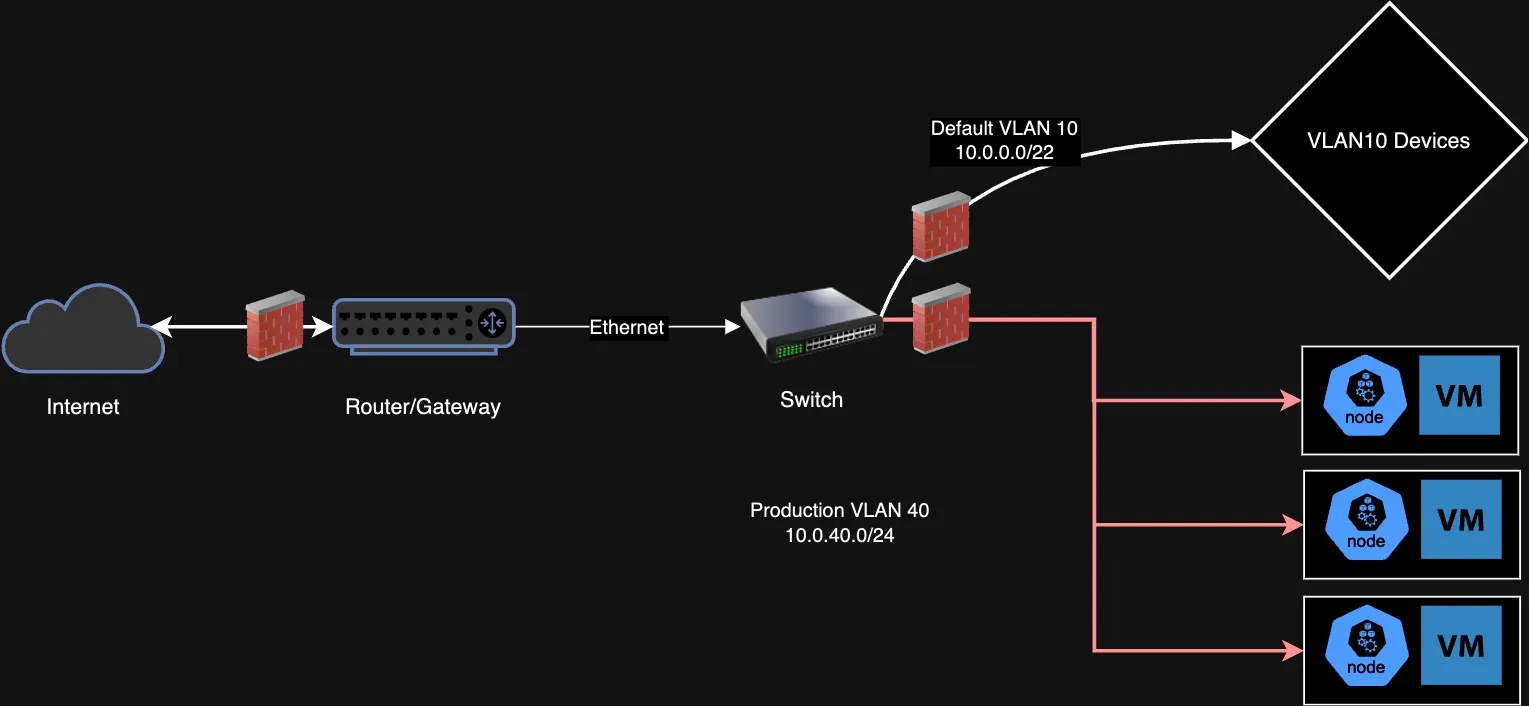
With the VLAN defined on the switch, a matching interface on pfSense, and DHCP and firewall rules in place, the Kubernetes nodes can be brought up inside the isolated segment. From there, MetalLB assigns load-balancer IPs from a pool inside the VLAN, Ingress-Nginx terminates TLS at a known address, cert-manager handles Let’s Encrypt certificates, and pfSense port-forwards from the WAN to the Ingress IP. Each of those is a meaningful project in its own right — but they all assume the network underneath is segmented, not flat.
Scope and Limitations
This article deliberately focuses on the network-segmentation layer. The following are important considerations for reliably operating a Kubernetes workload in production that have not been covered here:
- Observability, including measuring and alerting on uptime, error rate, and latency.
- High availability, including network redundancy.
- Additional network-level security, such as IDS/IPS and a Web Application Firewall to mitigate attacks like DDoS.
- The application-layer details — Ingress configuration, SSL termination, and the NAT-reflection redirect-loop that pfSense users often hit when accessing their public hostname from the LAN.
If you’re starting an on-premises Kubernetes deployment from scratch, the VLAN step is the unglamorous one worth doing first. Skip it and every later security decision has to compensate for a foundation that doesn’t isolate.